
How to Sync a Wii Fit Balance Board: 6 Steps
Th5
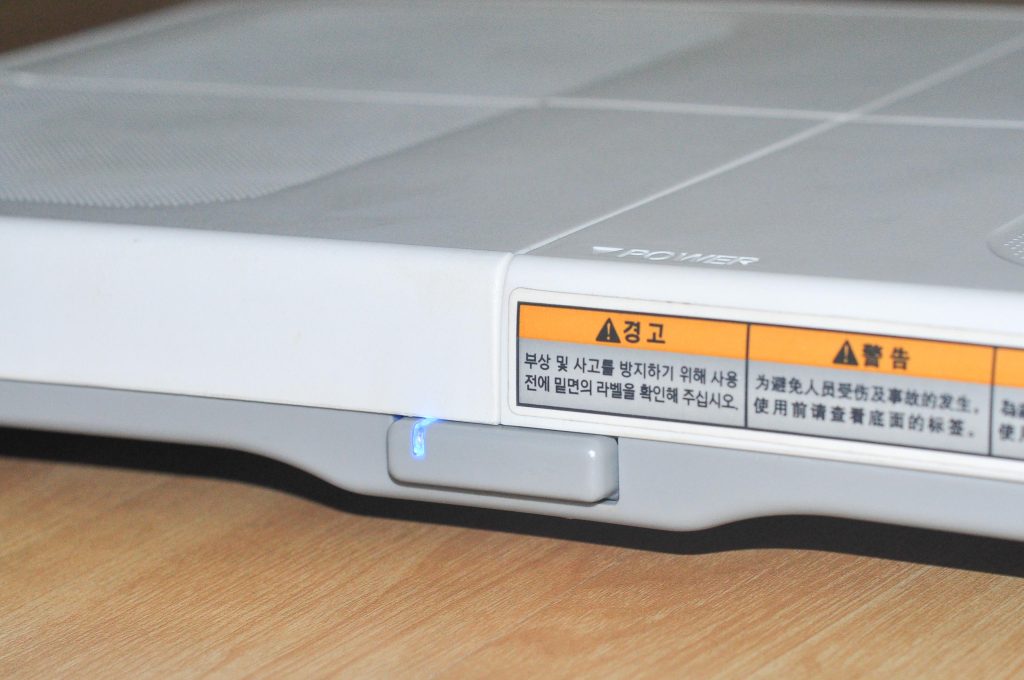
Syncing a Wii Fit Balance Board sounds like it should be as simple as pressing a button and triumphantly stepping into your virtual yoga destiny. Most of the time, it is. But because the Wii Balance Board is a slightly unusual accessory, it does not sync exactly like a Wii Remote. It needs a compatible game running, it uses its own SYNC button inside the battery compartment, and it confirms success with a steady blue power light.
If your Wii Fit Balance Board power light keeps blinking, refuses to connect, or seems to be playing hard-to-get with your Wii console, do not panic. The board is not judging your posture. It probably just needs to be paired correctly, fitted with fresh batteries, or synced from inside a Wii Balance Board-compatible game such as Wii Fit or Wii Fit Plus.
This guide explains how to sync a Wii Fit Balance Board in six simple steps, plus what to do when the light keeps blinking, the game does not detect movement, or the board seems connected but gives strange readings.
Before You Start: What You Need
Before syncing the Wii Fit Balance Board, make sure you have the basics ready. You need a Wii console, a Wii Remote, a Wii Balance Board-compatible game, and working AA batteries installed in the board. A compatible game matters because the Balance Board does not normally sync from the Wii Menu alone. It communicates with the console when supported software is running.
Look for the Wii Balance Board icon on the game packaging or manual. Popular compatible titles include Wii Fit, Wii Fit Plus, and several fitness, snowboarding, and sports games designed for the accessory. If you are trying to sync the board while playing a game that does not support it, the board may blink forever like a tiny blue lighthouse with abandonment issues.
How to Sync a Wii Fit Balance Board: 6 Steps
Step 1: Insert a Compatible Wii Balance Board Game
Place a Wii Balance Board-compatible game disc into the Wii console. From the Wii Menu, use the Wii Remote to select the Disc Channel and start the game. This step is important because syncing is completed through compatible software. If the game does not support the Balance Board, the console may ignore it completely.
For the cleanest setup, start with Wii Fit or Wii Fit Plus. These games were built around the board and usually walk you through the connection process clearly. If the game asks you to turn on or connect the Wii Balance Board, you are in the right place.
Step 2: Place the Balance Board Correctly
Put the Wii Fit Balance Board directly in front of the TV on a stable, flat, horizontal surface. The power button and blue light should face away from the TV, meaning you stand on the board while facing the screen. Avoid thick carpet, uneven flooring, slippery surfaces, or anything that causes the board to wobble.
If you are using the board on carpet, install the foot extensions that came with the accessory. They lift the board slightly so the sensors underneath can measure weight and movement accurately. Without enough clearance, the bottom of the board may touch the carpet and create incorrect readings.
Step 3: Open the Wii Console’s SD Card Slot Cover
On a standard Wii console, open the small SD Card slot cover on the front of the system. Inside, you will find the red SYNC button. This is the console button used for pairing accessories.
If you are using a Wii mini, the SYNC button is in a different location, on the left side of the console. Either way, the goal is the same: you need access to the console’s SYNC button before the Balance Board’s blue light stops blinking.
Step 4: Remove the Battery Cover on the Balance Board
Turn the Wii Fit Balance Board over carefully and remove the battery cover. Inside the battery compartment, you will see a small red SYNC button. This button is easy to miss, especially if you are looking for something dramatic. It is small, red, and absolutely essential.
Check the batteries while you are there. The Wii Balance Board uses AA batteries, and weak batteries are one of the most common reasons syncing fails. If the board has been sitting in a closet since the era of plastic guitar controllers, replace the batteries before troubleshooting anything else.
Step 5: Press the SYNC Button on the Balance Board
Press and release the red SYNC button inside the Wii Fit Balance Board battery compartment. The blue power LED on the board should begin blinking. That blinking light means the board is searching for the Wii console.
Do not hold the button down for a long time. A quick press and release is enough. Also, do not wander off to make coffee at this exact moment. The blinking window is limited, so move directly to the next step.
Step 6: Press the SYNC Button on the Wii Console
While the Balance Board’s blue power light is still blinking, quickly press and release the red SYNC button on the Wii console. When the sync works, the blinking light on the Balance Board will stop and remain steadily lit. That steady blue light is your victory signal.
Replace the battery cover on the board, return it to the floor, and follow any on-screen instructions in the game. You should now be ready to create or select a profile, perform a body test, play balance games, or discover that virtual ski jumping is harder than it looks.
How to Know the Sync Worked
The easiest sign is the blue power LED. If the light blinks and then stays on, the Wii Fit Balance Board is synced and recognized by the console. If the light keeps blinking and eventually turns off, the board did not connect.
You can also check the battery level from the Wii HOME Menu while the board is powered on. Press the HOME Button on the Wii Remote, and the Balance Board battery indicator should appear in the P4 position. That is normal. The Wii Balance Board uses the Player 4 slot, so do not worry if it does not appear as Player 1.
Why the Wii Fit Balance Board Will Not Sync
The Game Is Not Compatible
The Wii Balance Board only communicates with the console when a compatible game is being used. If you are trying to sync from the Wii Menu or inside unsupported software, the board may blink without connecting. Start a compatible game first, then repeat the sync process.
The Board Needs to Be Synced to That Specific Game
One detail many people miss is that the Wii Balance Board may need to be synced to each compatible game individually. If it worked in Wii Fit but not another fitness game, the board is not necessarily broken. Start the new game and sync the board when prompted.
The Batteries Are Weak
Low batteries can cause strange behavior: blinking, disconnecting, failed syncing, or inaccurate readings. Replace all batteries with a fresh set and make sure they are installed in the correct direction. Mixing old and new batteries is not recommended because one weak battery can drag down the whole team like a group project gone wrong.
The Console Needs a Quick Reset
If syncing still fails, turn off the Wii console and unplug the power cord for a short time. Plug it back in, restart the compatible game, and repeat the six syncing steps. This simple reset can clear temporary communication hiccups.
The Board Is Too Far Away or Poorly Positioned
Keep the board close enough to the console and TV setup for normal play. Also make sure the Wii Remote can be used comfortably while you are standing on the board. A range of about 3 to 10 feet from the sensor bar is a practical setup for most living rooms.
How to Sync a Wii Fit Balance Board with Wii U
If you are using the Wii Balance Board with a Wii U, the process depends on the software. In Wii Mode, start the game that uses the Wii Balance Board and follow the on-screen syncing instructions. For Wii Fit U, the game guides you through pairing during setup. Typically, you start the software, press the SYNC button on the Wii U console, remove the battery cover on the Balance Board, and press the board’s SYNC button.
As with the original Wii, do not assume the board will pair from any random menu. Start the compatible game first. The software is the traffic cop here, and without it, the Balance Board is basically standing around in sneakers waiting for instructions.
What If the Blue Light Keeps Blinking?
A blinking blue light means the board is trying to connect. If it keeps blinking and never becomes steady, try this quick checklist:
- Confirm that a Wii Balance Board-compatible game is running.
- Press and release the board SYNC button, then quickly press and release the console SYNC button.
- Use fresh AA batteries.
- Move the board closer to the console.
- Restart the game and try again.
- Unplug the Wii console briefly, reconnect it, and repeat the process.
Most syncing problems are solved by one of those fixes. The biggest mistake is pressing the buttons too slowly or trying to sync before the compatible game is active.
What If the Board Syncs but Does Not Read Weight Correctly?
If the Wii Fit Balance Board connects but gives odd readings, focus on placement and sensor clearance. The board should sit flat on the floor with nothing pressing against the bottom. If you are on carpet, use the foot extensions. If you are using a silicone cover or accessory sleeve, remove it and test again. Covers can sometimes affect how weight transfers to the sensors.
Also stand still when the game asks you to. The board is sensitive, and dramatic shifting during measurement can confuse it. Think less “action hero entrance” and more “statue pretending to enjoy exercise.”
Can You Sync More Than One Wii Balance Board?
A Wii console can use only one Wii Balance Board at a time. The board is treated differently from Wii Remotes and occupies the P4 connection while in use. If a Wii Remote is using that player slot, it may be disconnected while the Balance Board is active.
If you sync the same Balance Board to another Wii console, you may need to repeat the sync process when returning to the original console. This is normal and does not mean the accessory is damaged.
Safety and Setup Tips Before Playing
Once the Wii Fit Balance Board is synced, take a minute to set up your play area. Make sure the board is dry, clean, and stable. Do not place it on a wet floor. Keep pets, shoes, toys, and ambitious toddlers away from the play space. Fitness games are more fun when no one trips over a laundry basket during virtual aerobics.
Use the board barefoot or with appropriate footwear if the game recommends it. Avoid jumping on the board unless the game specifically instructs you to perform a movement. The accessory is sturdy, but it is still a measuring device, not a trampoline with a Nintendo logo.
Extra Experience: What Syncing a Wii Fit Balance Board Feels Like in Real Life
Here is the honest experience many Wii owners have: the first attempt feels confusing, the second attempt feels annoying, and the third attempt suddenly works because the correct game was finally running. The Wii Fit Balance Board is reliable once it is paired, but its setup process is old-school in a way that newer players may not expect. Modern devices often pair from a central Bluetooth menu. The Wii Balance Board prefers a more specific ritual: start the game, open the console flap, open the battery compartment, press the red buttons in the right order, and wait for the blue light.
One practical lesson is to prepare everything before pressing SYNC. Open the SD Card slot cover on the Wii first. Remove the battery cover on the board next. Put the board close to the console. Then press the board’s SYNC button and immediately press the console’s SYNC button. This avoids the classic problem where the blue light starts blinking while you are still flipping the board over, searching for the console button, and questioning your life choices.
Another real-world tip is to replace the batteries even if you think they are fine. A board that has been stored for years can behave unpredictably with old batteries. Sometimes the light appears, but the connection fails. Sometimes it syncs and then drops out. Sometimes the board works for five minutes and then disappears mid-session, which is rude behavior from a fitness accessory. Fresh batteries remove a major source of uncertainty.
Surface matters more than people expect. A Balance Board on thick carpet may sync perfectly but produce strange measurements. That can make users think the sync failed when the real issue is sensor contact. Foot extensions help because they lift the board enough for proper clearance. On a hard, level floor, the board usually feels more responsive and consistent.
It is also helpful to separate syncing problems from gameplay problems. If the blue light becomes steady, the board is paired. If the game still complains, check whether you are standing on it at the correct time, whether the board is facing the right direction, and whether the game profile setup is complete. Some games ask you to step off, then step on, then stand still. Ignoring those prompts can make the board look broken when it is simply waiting for you to stop tap-dancing on the scale.
Finally, do not underestimate how satisfying that steady blue light can be. The Wii Fit Balance Board belongs to a specific era of gaming when accessories were charming, physical, and occasionally dramatic. Once synced, it can still be a fun way to revisit balance games, yoga routines, strength exercises, and family fitness challenges. The process may feel a little fussy, but after the first successful pairing, repeating it becomes easy.
Conclusion
Learning how to sync a Wii Fit Balance Board is mostly about timing and setup. Start a compatible game, open the SYNC button covers, press the board’s red SYNC button, press the console’s red SYNC button while the blue light is blinking, and wait for the light to stay solid. If it fails, check the game compatibility, batteries, board placement, and console reset before assuming the accessory is broken.
The Wii Fit Balance Board may be a retro fitness gadget now, but it still works well when connected properly. Give it fresh batteries, a flat surface, and the right game, and it will be ready for yoga poses, balance tests, ski jumps, and that humbling moment when a cartoon trainer politely tells you to improve your posture.
Note: This guide is written for general setup and troubleshooting purposes for Wii and Wii Fit Balance Board users. It is not affiliated with or endorsed by Nintendo.
